Scientific Calculator Plus 1.6.0.39


Download via Google Play:
  Scientific Calculator Plus 1.6.0.39 on Google Play
Download :
  Download Scientific Calculator Plus 1.6.0.39

Current Version: 1.6.0.39
Requires Android: 2.2 and up
Category: Tools
v1.6.0.39 update:
* Faster calculation. Now it is running 10 times faster in PC. In Android it is about 1.5-3 times faster depending on the handware.
* Able to process any large values, like 1000**1000;
* Result is more accurate. The rounding error of is only 5*10E-48;
* Support infinite and nan;
* Calculate eigen values and vectors;
* Support user defined input pad for both smart calc and command line. And numbers and operators can also be configed;
* Bugs fixed;
Overview:
Scientific Calculator Plus is a powerful mathematical tool to do mathematical analysis and evaluate complicated mathematical expressions similar to Matlab. More than Matlab, it has a mathematical equation(s) solver which helps user to solve mathematical problems. It supports complex number, matrix, (higher level) integration, 2D, polar and 3D chart, string, programming (using a easy-to-use language called MFP) and unit conversion. It can run in both Android phones and tablets, PC or MAC with JAVA installed. Scientific Calculator Plus for Android includes a Scientific Calculator Plus for PC and Mac. User can connect mobile device to any PC or MAC via a USB cable, copy SDcardAnMath folder to his/her own directory and launch the JMathCmd.jar in it. User can also download standalone Scientific Calculator Plus for JAVA (and for .Net) and docs at our website
https://sites.google.com/site/cyzsoft/
. Users from mainland China please visit our homepage at
http://www.baidu.com/p/cyzsoft
This calculator has provided more than 100 diffused functions covering trigonometric calculation, complex number, matrix, integration, string and chart plotting. It is also able to handle mathematical operators like plus, division, power, percent, etc. And these operators fully support matrix and complex numbers. Thus user is able to evaluate complicated expressions, which are either not supported or hard to input in most traditional calculators. Moreover, the calculator is actually based on an easy-to-use programming language called MFP. Users can develop their own functions using this tool by a PC editor, store them in mobile SD-card and use them in calculator or command line. As a programmable tool, it can do everything.
The calculator can also think for user. It is able to solve unknown variables from complicated expressions and show the result to user. To calculate result of an expression, user input an expression like 3 + log(4.1 / avg(1,5,-3)). To solve unknown variables, user input single expression like log(x) – 7== 3, or a group of expressions like
y1/3+y2==7
y2/2-y3+y1==9
y3+y1+y2==2.4
. Then simply press start button, user will see value of 3 + log(4.1 / avg(1,5,-3)) or solved x or y1, y2 and y3 value.
This calculator has two basic user interfaces: smart calculator interface and command line interface. In the smart calculator interface, user is able to define variables, solve equation(s) and input expression(s) from historical records, using keyboard or clicking function buttons. Function buttons are configurable so that user is able to define his/her input keypads to input user-defined functions quickly.
User can also input expressions and plot 2D, polar or 3D charts in smart calculator. The number of unknown variables and variable name determine whether 2D, polar or 3D chart is plotted. After chart is plotted, smart calculator will show chart snapshot in the output box and history record. User can review the chart by simply clicking the chart snapshot
In the command-line interface (which works like Matlab), user uses keyboard to input expressions and sees the print output (which is not shown in the calculator interface) and return value. Command-line interface is best tool for developers to output intermediate results in their functions.
In order to help user input and evaluate (higher level) integration and plot charts, this calculator includes built-in integration and chart-plotting utilities. User no longer needs to type long and complicated expressions. Instead, by simply filling the text fields and pressing buttons, user will see the results or the charts. All the charts are automatically saved in SD-card which can be viewed and managed by file manager of the calculator later on.
Like Matlab, the calculator also provides a small program editor which gives developers much convenience to build their own functions. Nevertheless, they can also user a PC editor to do this job and save the program files in SD-card for future use.

Sidebar Plus (Multi-bars) 3.3.140421


Current Version: 3.3.140421
Requires Android: 2.2 and up
Category: Tools
v3.3.140421 update:
Ver 3.3
- Fixed force closes on Android 4.3
Full change logs: http://goo.gl/mdycRa
Overview:
Sidebar Plus – brilliant multi-tasking from anywhere
It’s light, fast, customizable to your taste. You can put various items in the sidebars such as apps, contacts, commonly accessed settings, shortcuts, and DashClock extensions as well at widgets. It supports multiple bars, as well as change the visuals and trigger options for the bars.
Features
☆ Create multiple bars that can open from aside
☆ Pin apps, common settings, contacts, shortcuts into bar
☆ Big Bar brings favorite apps, frequent contacts, settings, weather, running apps, widgets in a bar
☆ Customize a bar with theme, colors, icon size, opacity, bar alignment (left/right)
☆ Deeply integrate to system: slide to open bar while using other app
☆ Include 3 themes: dark, light, holo-dark.
How to cook a bar
A bar consists of items and options. Items are apps, settings, shortcuts, contacts, bookmarks, widgets, Dashclock extension. No limit on a number of items on a bar. Bar restricts to items from the same category except mixed bar and big bar. Options includes themes, item style, icon style, sort order, search box and bar opacity.
How to use a bar
☆ Slide from left side (or right side if right sidebar alignment) OR
☆ Long-click on leftmost (or rightmost) to open
☆ Fling to quick open
☆ Click on free area or fling in reverse direction to close
☆ Click on an item to run default action. Long-click on a action to run secondary action
☆ Click on sidebar notification to toggle sidebar visibility
☆ Shortcut to quickly open a bar
Notification
To prevent Sidebar from being kill by system.
Languages
☆ English
☆ German
☆ French
☆ Japanese
☆ Dutch
☆ Polish
Portuguese/BR
☆ Turkish
☆ Czech
☆ Spanish
☆ Italian
5 days of full feature trial. After the trial period, you can use upto 2 bars (10 items per small bar or 4 items per big bar) without upgrading
Full user guide: http://www.rootuninstaller.com/p/sidebar-plus.html
Permission: http://goo.gl/Up2l84
Vote for new features: http://goo.gl/Hr4oRM

SongPop Plus 1.13.3


Download via Google Play:
  SongPop Plus 1.13.3 on Google Play
Download :


 Current Version: 1.13.3
Requires Android: 2.3 and up
Category: Music
v1.13.3 update:
1.13.0
* Bug fixes
* Performance improvements
Overview:
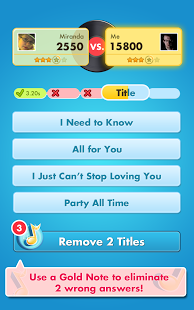
Are you ready to rock? Music lovers agree this is one of the most addictive games ever!
* 2013 Webby Award People’s Voice Winner – Social Gaming (Handheld Devices)
* Top Rated Social Game of 2012 – Facebook
* “I will not rest until every genre has been unlocked and mastered.” – Kotaku
SIMPLE, FAST & FUN
* Challenge your friends or play with other music fans
* Hear song clips from thousands of ORIGINAL artists in over 300 genres
* Guess the artist or song faster than your friends
* Unlock more songs, more playlists and become a true music master!
BONUS FEATURES FOR PLUS VERSION
* Play up to 40 simultaneous games (2x the free version)
* No third-party ads to slow down game play
* Longer music clips
* Higher quality sound clips
WHATEVER YOUR MUSIC STYLE, WE’VE GOT YOU COVERED
* Today’s Hits to Classic Rock
* Country to Rap and Hip-Hop
* Young Pop Stars to Indie and Latin Hits
* Collections for every decade: 2000s, 90s, 80s, 70s, 60s and more!
* New music & playlists added every week to keep it fresh
MORE WAYS TO ENJOY THE MUSIC YOU LOVE ON SONGPOP
* See which artists are on tour near you!
* Watch music videos of your favorite songs on YouTube
* Share your favorite songs with your SongPop chat buddies
* Easily find other players who share your song tastes

Weatherzone Plus 4.1.6


 Current Version: 4.1.6
Requires Android: Varies with device
Category: Weather
v4.1.6 update:
v4.1.6
- Fixed manual selection of clock app for classic large widget
- Miscellaneous fixes and improvements
v4.1.5
- Fixed Large Classic widget size on Samsung devices
- Fixed default size for resizable widget on Samsung devices
- Fixed tapping on clock for large classic widget.
v4.1.3
Back by popular demand!! Classic widgets are now available alongside our new resizable widget.
v4.1
- Brand new resizable and configurable widget
Overview:
For serious weather watchers, who rely on weather for work or play, Weatherzone Plus+ gives you all the free app features plus more. These include 3 hourly forecasts, graphs of forecast temperatures over the next 48 hours and more detailed rain forecasts. You can also store unlimited favourites for rapid access.
► Weatherzone uses Bureau of Meteorology forecasts and our meteorologists to produce accurate forecasts for Australia and the world.
► What features are exclusive to Weatherzone Plus+?
✓ Exclusive 3 hourly temperature, icon, wind and rain probability forecasts for the next 48 hours for all major Australian locations from Opticast®
✓ Lightning tracker for Weatherzone Pro subscribers (login in settings)
✓ 7 day forecasts for 2000+ Australian locations for minimum, maximum temperature, icon, rain probability/likely amount and 9am/3pm wind.
✓ 28 Day Rainfall Forecast
✓ Composite Radar / Satellite Animator using Google Maps – BETA
✓ Weather news stories from our meteorologist’s
✓ National Video forecast
✓ 1000+ international location forecasts and observations
✓ Exclusive Australian synoptic map with rain areas and amounts for 7 days (drawn by Weatherzone meteorologist every 12 hours)
► What are other features of Weatherzone Plus+?
✓ Push notifications for BOM Warnings
✓ Persistent or daily forecast notifcations
✓ Real-time observations of temperature, wind speed and direction, dew point, relative humidity, pressure and rain since 9 am
✓ Sunrise and Sunset times
✓ Max UV rating
✓ Pollen Forecast (for capital cities except Darwin)
✓ Fire Danger Rating (where available)
✓ Navigation Drawer
✓ GPS search for current location
✓ Past 24hours observations
✓ Month to Date and Almanac
✓ Dynamic animated backgrounds that change as the weather does
✓ Real-time weather warnings
✓ Animated radar from 58 locations around Australia
✓ Animated National and State composite radars
✓ Animated satellite of Australia
✓ Can store and display UNLIMITED favourite locations
✓ 3 Home screen widgets
– 4×2 Large w/ Clock
– 4×1 Medium
– 2×1 Small
✓ No third party advertising
► How do we make 3 hour forecasts?
Opticast® uses real time observations and up to 10 global weather prediction models that are intelligently combined to build the most accurate high resolution short term forecasts available to the Australian public.
► How do we provide more forecasts than the others?
We source data from the Bureau of Meteorology and then fill the gaps with our own team of professional meteorologists and in-house high resolution forecasting models.
► Who is Weatherzone?
Weatherzone is Australia’s largest commercial meteorological organisation supplying most of Australia’s media, electricity companies and other weather sensitive industries. Weatherzone uses Bureau of Meteorology resources and unique internally developed computer modeling to produce the most accurate forecasts available in Australia. We are a team of meteorologists and developers that are dedicated to providing innovative weather services.
## If you are having problems accessing the widgets please make sure the app is installed to the phone and not on your SD Card. ##
Australian weather, Aussie weather, Sydney Weather, Melbourne Weather.
Support: http://help.weatherzone.com.au
If you have a suggestion for new features or content or find a bug, email us at android@weatherzone.com.au

SongPop Plus 1.11.0


Download via Google Play:
  SongPop Plus 1.11.0 on Google Play
Download :
  Download SongPop Plus 1.11.0
 
 Current Version: 1.11.0
Requires Android: 2.3 and up
Category: Casual
v1.11.0 update:
1.11
* Updated the Home screen for easier navigation
* Bug fixes
Overview:
Are you ready to rock? Music lovers agree this is one of the most addictive games ever!
* 2013 Webby Award People’s Voice Winner – Social Gaming (Handheld Devices)
* Top Rated Social Game of 2012 – Facebook
* “I will not rest until every genre has been unlocked and mastered.” – Kotaku
SIMPLE, FAST & FUN
* Challenge your friends or play with other music fans
* Hear song clips from thousands of ORIGINAL artists in over 300 genres
* Guess the artist or song faster than your friends
* Unlock more songs, more playlists and become a true music master!
BONUS FEATURES FOR PLUS VERSION
* Play up to 40 simultaneous games (2x the free version)
* No third-party ads to slow down game play
* Longer music clips
* Higher quality sound clips
WHATEVER YOUR MUSIC STYLE, WE’VE GOT YOU COVERED
* Today’s Hits to Classic Rock
* Country to Rap and Hip-Hop
* Young Pop Stars to Indie and Latin Hits
* Collections for every decade: 2000s, 90s, 80s, 70s, 60s and more!
* New music & playlists added every week to keep it fresh
MORE WAYS TO ENJOY THE MUSIC YOU LOVE ON SONGPOP
* See which artists are on tour near you!
* Watch music videos of your favorite songs on YouTube
* Share your favorite songs with your SongPop chat buddies
* Easily find other players who share your song tastes

Holo Camera PLUS 2.7.6.1


Current Version: 2.7.6.1
Requires Android: 4.0 and up
Category: Photography
v2.7.6.1 update:
Version 2.7.6:
-Fixed stretched preview problems in After Effects
-Image size option in After Effects now works properly
-Added Preview Size Adjustment under Miscellaneous tweaks
For New Samsung Devices (may work on other supported models):
-Added AE-Bracket HDR Adjustment
-Added Zero Shutter Lag adjustment
Version 2.7.6.1:
Added one time license checking to secure customer information from leaking in piracy markets.
Keep supporting with the good ratings! Means a lot to me :)
Overview:
******************FEATURED ON REDIFF NEWS, SILOBREAKER AND CNET*****************
******************FEATURED AMONG TOP 100 OF ANDROID PHOTO APPS WORLDWIDE, TOP 50 IN 11 COUNTRIES*****************
Holo Camera+ is designed to work with all devices running Android 4.0 ( ICS ) and higher.
HOLO CAMERA VERSION 2.7 IS HERE!! FEATURING A SLICK NEW UI !
Holo Camera+ is a source compiled, minimalistic version of the AOSP Android 4.4 KITKAT Camera.
Forget the days of washed out, blurry images, with dull colors. Our special Opti™ mode is here to liven up all your pics! Now comes with After Effects BETA! A revolutionary new way to edit pics BEFORE saving them!
Holo Camera+ has the following features:
CAMERA:
• 3 modes: camera, video recorder and panorama
• Android 4.4 ARC UI
• Configurable Volume Rocker.
• New FX modes
• New Scene modes
• Silent mode (might not work on some devices)
• Pinch to zoom
• Picture quality setting (low/medium/high/ultra)
• Timer
• Burst mode
• Thumbnail Review
• ISO Mode Settings
• Flicker Reduction/Anti-Banding
• Preview Size Adjustment
• Zero Shutter Lag
• Guidelines
• Video quality adjustable
• Per thumbnail context menu.
• Sliding Drawer for quick options.
• Flash Mode
• Live FX
• “ULTRA HD” resolution for devices with more than 8mp Camera. It can be turned on from Miscellaneous Tweaks>Ultra HD
• Configurable UHD Aspect Ratio: Choose between 4:3 or 16:9
• Separate tweaks for front and back camera.
• Scene mode
• Auto Exposure Settings
• Skin Tone Enhancement (NEW!)
HDR Support
Additional Settings:
* Silent Shutter Mode.
* Sunlight Visibility Mode
* Storage Location Settings.
* OPTI™ MODE: With OPTI™ CONTRAST, OPTI™ BRIGHTNESS, OPTI™ SHARPNESS AND OPTI™ SATURATION. With smart pixel by pixel recoloring LIVE and adjustable parameters, forget the days of bad images, take awesome pics with the most vibrant colors and clearest details!
The ALL NEW AFTER EFFECTS (BETA): A Revolutionary way to edit pics before saving!
Currently works with the back camera and supports 10 adjustable tweaks:
-Rotation
-Sepia Toning(RGB)
-Sharpness
-Contrast
-Saturation
-Snow Effect
-Blur
-Brightness
-Mean Removal
-Flip
-Rounded corners
-More coming!
GALLERY:
• Ultra fast photos and videos viewer
• Grid view/Filmstrip view
• Swipe to delete
• Slideshow mode
• TONS of cool new features!!
• A VERY POWERFUL Image editor.
FAQ:
Q: What about Photo Sphere?
A: Unfortunately, PhotoSphere isn’t opensource, and we are not allowed to publish such apps on Play Store.
Thank you for supporting me (the Dev)! I am a High School student and every few purchases helps me to buy books.
IMPORTANT NOTES:
1. Before giving poor reviews, please mail me ( avijitg22@gmail.Com ) I will try my best to help you. If i cannot, full refund will be given. But please email me, i cannot help you just by reading review.

2. Custom roms are NOT officially supported. If your custom rom or ion kernel causes video camera or anything else to force close, do not give me poor review. I’ll refund you.
3. Opti mode might not work on certain devices. Please do not rate me bad because of Opti mode, because opti mode scans your phone’s hardware abstraction layer (HAL). If anything does not work in Opti mode, it is probably your phone/camera’s fault. Please be considerate before rating me 1 star. :)
BIG thanks to Google for their AOSP Source Code. Without them, this app would have been nowhere.
Thanks, and keep enjoying this app, and please, I’ve been working very hard to make sure the app runs smooth and all optimizations work on older devices, so if you like my effort, please leave a 5 star rating. :)
Thanks and lots of love!!
Tags: Android 4.3 Camera, Camera JB+, Snap, Jellybean Camera, Quickshot, Panorama, HDR, Android 4.3 Jelly Bean Camera app , Android 4.3 Jelly Bean Gallery app

Holo Camera PLUS 2.7.2


Download via Google Play:
 
 Current Version: 2.7.2
Requires Android: 4.0 and up
Category: Photography
v2.7.2 update:
Version 2.7.2:
Happy New Year!
-Added an option to launch either Holo Mode or AFX mode by default in the launch screen. Once you activate this, it can be deactivated by going to Software Tweaks>Clear launch settings
-Fixed text alignment problems in startup screen
Keep supporting and the ratings! Means a lot to me :)
Overview:
******************FEATURED ON REDIFF NEWS, SILOBREAKER AND CNET*****************
Holo Camera+ is designed to work with all devices running Android 4.0 ( ICS ) and higher.
HOLO CAMERA VERSION 2.7 IS HERE!! FEATURING A SLICK NEW UI !
Holo Camera+ is a source compiled, minimalistic version of the AOSP Android 4.4 KITKAT Camera.
Forget the days of washed out, blurry images, with cool colors. Our special Opti™ mode BETA is here to liven up all your pics! Now comes with After Effects BETA! A revolutionary new way to edit pics BEFORE saving them!
Holo Camera+ has the following features:
CAMERA:
• 3 modes: camera, video recorder and panorama
• Android 4.4 ARC UI
• Volume Rocker as Camera Shutter
• New FX modes
• New Scene modes
• Silent mode (might not work on some devices)
• Pinch to zoom
• Picture quality setting (low/medium/high/ultra)
• Timer
• Burst mode
• Thumbnail Review
• ISO Mode Settings
• Flicker Reduction/Anti-Banding
• Guidelines
• Video quality adjustable
• Per thumbnail context menu.
• Sliding Drawer for quick options.
• Flash Mode
• Live FX
• “ULTRA HD” resolution for devices with more than 8mp Camera. It can be turned on from Miscellaneous Tweaks>Ultra HD
• Configurable UHD Aspect Ratio: Choose between 4:3 or 16:9
• Separate tweaks for front and back camera.
• Scene mode
• Auto Exposure Settings
• Skin Tone Enhancement (NEW!)
HDR Support
Additional Settings ( SWIPE RIGHT FROM CAMERA AND PRESS MENU OR SWIPE FROM LEFT MARGIN TO ACCESS:)
* Silent Shutter Mode.
* Sunlight Visibility Mode
* Storage Location Settings.
* OPTI™ MODE BETA: With OPTI™ CONTRAST, OPTI™ BRIGHTNESS, OPTI™ SHARPNESS AND OPTI™ SATURATION. With smart pixel by pixel recoloring LIVE and adjustable parameters, forget the days of bad images, take awesome pics with the most vibrant colors and clearest details!
Note: Opti Mode is a beta feature, and might not work on certain devices. Please DO NOT rate me bad because of Opti Mode, because Opti Mode scans your phone’s hardware abstraction layer (HAL). If anything does not work in Opti mode, it is probably your phone/camera’s fault. Please be considerate before rating me 1 star. :)
The ALL NEW AFTER EFFECTS (BETA): A Revolutionary way to edit pics before saving!
Currently works with the back camera and supports 10 adjustable tweaks:
-Rotation
-Sepia Toning(RGB)
-Sharpness
-Contrast
-Saturation
-Snow Effect
-Blur
-Brightness
-Mean Removal
-Flip
-Rounded corners
-More coming!
GALLERY:
• Ultra fast photos and videos viewer
• Grid view/Filmstrip view
• Swipe to delete
• Slideshow mode
• TONS of cool new features!!
• A VERY POWERFUL Image editor.
FAQ:
Q: What about Photo Sphere?
A: Unfortunately, PhotoSphere isn’t opensource, and we are not allowed to publish such apps on Play Store.
Thank you for supporting me (the Dev)! I am a High School student and every few purchases helps me to buy books.
Please feel free to mail me regarding issues, and I’ll try my best to fix them.
NOTE: BEFORE GIVING POOR REVIEWS, PLEASE MAIL ME ( avijitg22@gmail.com ) I WILL TRY MY BEST TO HELP YOU. IF I CANNOT, FULL REFUND WILL BE GIVEN. BUT PLEASE EMAIL ME, I CANNOT HELP YOU JUST BY READING REVIEW.
BIG thanks to Google for their AOSP Source Code. With them, this app would have been nowhere.
Thanks, and keep enjoying this app, and please, I’ve been working very hard to make sure the app runs smooth and all optimizations work on older devices, so if you like my effort, please leave a 5 star rating. :)
Thanks and lots of love!!
Tags: Android 4.3 Camera, Camera JB+, Snap, Jellybean Camera, Quickshot, Panorama, HDR, Android 4.3 Jelly Bean Camera app , Android 4.3 Jelly Bean Gallery app

Traffic Monitor Plus 5.3.1


Download via Google Play:

Download :

Current Version: 5.3.1
Requires Android: 2.2 and up
Category: Productivity
v5.3.1 update:
- We added a Network Monitor feature. You can report problems with voice or data services and view reports of other users in your region. Please visit the Quality tab in order to give the brand new NetMonitor a try.
- Our integrated maps come with new menu options.
- We fixed the per-app data aggregation for some 4.3 firmwares.
- The data export feature is available again.
- 5.3.1 improves the speed test on some 4.4 (KitKat) devices.
Overview:
The RadioOpt Traffic Monitor measures data traffic consumed by your wifi and cellular interface as well as your outgoing and incoming phone calls and SMS.
Download and upload throughput as well as ping durations can be measured via an integrated speed test.
The QoS (Quality of Service) module measures the connectivity, availability of data services and your call success rate.
The task manager displays running processes which can further be stopped upon request.
You may want to add the traffic monitor widget to your home screen. You can choose between a 4×1 and three 1×1 widgets providing the current counters for data, voice, and SMS.
Data traffic counter
– Data traffic counter for wireless and mobile access, separated by up-and download
– The quality measure gives you feedback about the availability of data services.
– Traffic summary fur current day, week and month
– Configurable start day of monthly and weekly measurement period
– Tethering traffic, when device is used as mobile hotspot
– Traffic statistics per application with history for current and last day as well as current and last month
Phone Call Counter
– Aggregates your incoming and outgoing phone call minutes
– The service counter shows the availability of the cellular network and voice service
– Check your call success rate in order to evaluate your voice call performance
– Statistics are provided for the current day, week and month
SMS Counter (Widget)
– Aggregates your incoming and outgoing SMS.
Speedometer
– Measure speed and delay of your wireless connection
– History with your geo-located speed tests
– Benchmark your data throughput against the average performance in your geographic area
– Post your speed test results on Facebook and Twitter and share your performance with your friends.
Task manager
– Check currently running apps incl. memory usage
– Kill memory / traffic hungry apps
Furthermore, the app shows the following information (accessible via the options menu in the data traffic view):
– Battery status (level, voltage, temperature)
– Mobile network, cell tower, and cellular signal strength information
- GPS status
The application is AD FREE. Please give us a COMMENT and RATE.
Thank you!
—————
Tags: traffic monitor, network monitor, network counter, task manager, task killer, data traffic, data volume, traffic management, monthly data alarm, data manager, speedtest, speed test, data rate, data throughput, battery information, application data, application traffic, Quality of Service, QoS, Voice Counter, Voice Minutes, Call Counter, Phone Calls, SMS Counter

Scientific Calculator Plus 1.5.5.37


Download via Google Play:

Download :
 
 
Current Version: 1.5.5.37
Requires Android: 2.1 and up
Category: Tools
v1.5.5.37 update:
* Be able to plot polar graph. In Smart Calculator a polar graph is generated if the expressions include only 2 variables and at least one is Greek letter α, β, γ or θ. The input pad of Smart Calculator includes a θ button to assist user to input polar expressions;
* Add input function to input values from command line while program is running;
* Support multiple SD cards. User is able to select the storage to place app’s data and SCP for JAVA;
* Functionality optimized and bugs fixed;
Overview:
Scientific Calculator Plus is a powerful mathematical tool to do mathematical analysis and evaluate complicated mathematical expressions similar to Matlab. More than Matlab, it has a mathematical equation(s) solver which helps user to solve mathematical problems. It supports complex number, array (matrix), (higher level) integration, 2D, polar and 3D chart, string, programming (using a language similar to Basic and Matlab) and unit conversion. It can run in both Android phones and tablets, PC and MAC with JAVA support enabled. Scientific Calculator Plus for Android includes a Scientific Calculator Plus for PC and Mac. User can connect mobile device to any PC or MAC via a USB cable, copy SDcardAnMath folder to his/her own directory and launch the JMathCmd.jar in it.
This calculator has provided more than 100 diffused functions covering trigonometric calculation, complex number, matrix, integration, string and chart plotting. It is also able to handle mathematical operators like plus, division, power, percent, etc. And these operators fully support matrix and complex numbers. Thus user is able to evaluate complicated expressions, which are either not supported or hard to input in most traditional calculators. Moreover, the calculator is actually based on an easy-to-use programming language called MFP. Users can develop their own functions using this tool by a PC editor, store them in mobile SD-card and use them in calculator or command line. As a programmable tool, it can do everything.
The calculator can also think for user. It is able to solve unknown variables from complicated expressions and show the result to user. To calculate result of an expression, user input an expression like 3 + log(4.1 / avg(1,5,-3)). To solve unknown variables, user input single expression like log(x) – 7== 3, or a group of expressions like
y1/3+y2==7
y2/2-y3+y1==9
y3+y1+y2==2.4
. Then simply press start button, user will see value of 3 + log(4.1 / avg(1,5,-3)) or solved x or y1, y2 and y3 value.
This calculator has two basic user interfaces: smart calculator interface and command line interface. In the smart calculator interface, user is able to define variables, solve equation(s) and input expression(s) from historical records, using keyboard or clicking function buttons. Function buttons are configurable so that user is able to define his/her input keypads to input user-defined functions quickly.
User can also input expressions and plot 2D, polar or 3D charts in smart calculator. The number of unknown variables and variable name determine whether 2D, polar or 3D chart is plotted. After chart is plotted, smart calculator will show chart snapshot in the output box and history record. User can review the chart by simply clicking the chart snapshot
In the command-line interface (which works like Matlab), user uses keyboard to input expressions and sees the print output (which is not shown in the calculator interface) and return value. Command-line interface is best tool for developers to output intermediate results in their functions.
In order to help user input and evaluate (higher level) integration and plot charts, this calculator includes built-in integration and chart-plotting utilities. User no longer needs to type long and complicated expressions. Instead, by simply filling the text fields and pressing buttons, user will see the results or the charts. All the charts are automatically saved in SD-card which can be viewed and managed by file manager of the calculator later on.
Like Matlab, the calculator also provides a small program editor which gives developers much convenience to build their own functions. Nevertheless, they can also user a PC editor to do this job and save the program files in SD-card for future use.
 

Weatherzone Plus 4.0.1


Download via Google Play:

Download :
 
 
Current Version: 4.0.1
Requires Android: Varies with device
Category: Weather
v4.0.1 update:
- Totally refreshed user interface with slide-out navigation drawer
- Fire Danger Rating (where available)
- Weatherzone News articles
- Push Notification Warnings
- Persistent and Daily forecast notifications
- National Video Forecast
- Google Maps radar animator – Beta
- Full 48hrs in graph
- Performance increases and miscellaneous fixes
Overview:
For serious weather watchers, who rely on weather for work or play, Weatherzone Plus+ gives you all the free app features plus more. These include 3 hourly forecasts, graphs of forecast temperatures over the next 48 hours and more detailed rain forecasts. You can also store unlimited favourites for rapid access.
► Weatherzone uses Bureau of Meteorology forecasts and our meteorologists to produce accurate forecasts for Australia and the world.
► What features are exclusive to Weatherzone Plus+?
✓ Exclusive 3 hourly temperature, icon, wind and rain probability forecasts for the next 48 hours for all major Australian locations from Opticast®
✓ Lightning tracker for Weatherzone Pro subscribers (login in settings)
✓ 7 day forecasts for 2000+ Australian locations for minimum, maximum temperature, icon, rain probability/likely amount and 9am/3pm wind.
✓ Composite Radar / Satellite Animator using Google Maps – BETA
✓ Weather news stories from our meteorologist’s
✓ National Video forecast
✓ 1000+ international location forecasts and observations
✓ Exclusive Australian synoptic map with rain areas and amounts for 7 days (drawn by Weatherzone meteorologist every 12 hours)
► What are other features of Weatherzone Plus+?
✓ Push notifications for BOM Warnings
✓ Persistent or daily forecast notifcations
✓ Real-time observations of temperature, wind speed and direction, dew point, relative humidity, pressure and rain since 9 am
✓ Sunrise and Sunset times
✓ Max UV rating
✓ Pollen Forecast (for capital cities except Darwin)
✓ Fire Danger Rating (where available)
✓ Navigation Drawer
✓ GPS search for current location
✓ Past 24hours observations
✓ Month to Date and Almanac
✓ Dynamic animated backgrounds that change as the weather does
✓ Real-time weather warnings
✓ Animated radar from 58 locations around Australia
✓ Animated National and State composite radars
✓ Animated satellite of Australia
✓ Can store and display UNLIMITED favourite locations
✓ 3 Home screen widgets
– 4×2 Large w/ Clock
– 4×1 Medium
– 2×1 Small
✓ No third party advertising
► How do we make 3 hour forecasts?
Opticast® uses real time observations and up to 10 global weather prediction models that are intelligently combined to build the most accurate high resolution short term forecasts available to the Australian public.
► How do we provide more forecasts than the others?
We source data from the Bureau of Meteorology and then fill the gaps with our own team of professional meteorologists and in-house high resolution forecasting models.
► Who is Weatherzone?
Weatherzone is Australia’s largest commercial meteorological organisation supplying most of Australia’s media, electricity companies and other weather sensitive industries. Weatherzone uses Bureau of Meteorology resources and unique internally developed computer modeling to produce the most accurate forecasts available in Australia. We are a team of meteorologists and developers that are dedicated to providing innovative weather services.
## If you are having problems accessing the widgets please make sure the app is installed to the phone and not on your SD Card. ##
Australian weather, Aussie weather, Sydney Weather, Melbourne Weather.
Support: http://help.weatherzone.com.au
If you have a suggestion for new features or content or find a bug, email us at android@weatherzone.com.au

Train Crisis Plus 2.5.1


Download via Google Play:

Download :
 
 
Current Version: 2.5.1
Requires Android: 2.2 and up
Category: Brain & Puzzle
v2.5.1 update:
New in 2.5:
- Support for Android 4.4 (Kitkat) inmersive mode
- New complete Era, with 24 new levels and new elements to play: Future Era
- Some of the hardest levels have been made easier
- New social features: with Google Play Game Services: leaderboard, achievements, shared friends progress
- Cloud saving: share your progress across multiple devices and restore it upon reinstallation
- Option to view solutions of each level.
- Bug fixes
Overview:
***** NOW 7 COMPLETE ERAS INCLUDED! *****
***** This full version is 100% ads free and has no limited tries for levels. *****
Would you like to travel through the history of the railroad?
This amazing game lets you play in four different railroad environments, where your goal is to overcome all the obstacles that appear on each level and guide each colored train toward its corresponding destination.
Download Train Crisis now! A puzzle and addictive strategy game with HD graphics where you have to prove your quick mind and reflexes in full 3D environment.
Train Crisis promises hours of challenging fun!
Features:
- 7 Eras of rail-road history (Industrial Era, Far West Era, Modern Era and Future Era).
- Spectacular High-definition 3D environments that recreate perfectly the three eras with many details as vegetation, animals, mountains, rocks, tunnels, banks, portals, etc.
- Train Crisis provides 168 challenging levels for players to conquer.
- Social features with Google Play Game Services: leaderboard, achievements, shared friends progress
- Cloud saving: share your progress across multiple devices and restore it upon reinstallation
- You must interact with several elements to get past the level: changing junctions; timed traffic lights; trap tunnels; transportation of money; ghost trains and parts of the track obstructed with rocks you must blow up.
- Spectacular colorful graphics effects with explosions of trains and rocks.
- Support for Android 4.4 (Kitkat) inmersive mode
Visit our Facebook site and twitter. Keep you informed on last news and announcements of Train Crisis HD: https://www.facebook.com/traincrisis
https://www.twitter.com/traincrisis
 

Scientific Calculator Plus 1.5.4.36


Download via Google Play:

Download :
 
 
Current Version: 1.5.4.36
Requires Android: 2.1 and up
Category: Tools
v1.5.4.36 update:
* Provide input method for command line tool, script editor, plot graph tool and integrate tool. The input method is very similar to the input key pad for Smart Calculator. User can swipe left and right to switch to different input pads. Function and variable dictionary is activated if user selects abc character input pad. This new functionality can significantly accelerate input.
* Add adj and cofactor functions for matrix;
* Several bugs fixed;
Overview:
Scientific Calculator Plus is a powerful mathematical tool to do mathematical analysis and evaluate complicated mathematical expressions similar to Matlab. More than Matlab, it has a mathematical equation(s) solver which helps user to solve mathematical problems. It supports complex number, array (matrix), (higher level) integration, 2D and 3D chart, string, programming (using a language similar to Basic and Matlab) and unit conversion. It can run in both Android phones and tablets, PC and MAC with JAVA support enabled. Scientific Calculator Plus for Android includes a Scientific Calculator Plus for PC and Mac. User can connect mobile device to any PC or MAC via a USB cable, copy SDcardAnMath folder to his/her own directory and launch the JMathCmd.jar in it.
This calculator has provided more than 100 diffused functions covering trigonometric calculation, complex number, matrix, integration, string and chart plotting. It is also able to handle mathematical operators like plus, division, power, percent, etc. And these operators fully support matrix and complex numbers. Thus user is able to evaluate complicated expressions, which are either not supported or hard to input in most traditional calculators. Moreover, the calculator is actually based on an easy-to-use programming language called MFP. Users can develop their own functions using this tool by a PC editor, store them in mobile SD-card and use them in calculator or command line. As a programmable tool, it can do everything.
The calculator can also think for user. It is able to solve unknown variables from complicated expressions and show the result to user. To calculate result of an expression, user input an expression like 3 + log(4.1 / avg(1,5,-3)). To solve unknown variables, user input single expression like log(x) – 7== 3, or a group of expressions like
y1/3+y2==7
y2/2-y3+y1==9
y3+y1+y2==2.4
. Then simply press start button, user will see value of 3 + log(4.1 / avg(1,5,-3)) or solved x or y1, y2 and y3 value.
This calculator has two basic user interfaces: smart calculator interface and command line interface. In the smart calculator interface, user is able to define variables, solve equation(s) and input expression(s) from historical records, using keyboard or clicking function buttons. Function buttons are configurable so that user is able to define his/her input keypads to input user-defined functions quickly.
User can also input expressions and plot 2D or 3D charts in smart calculator. The number of unknown variables determine whether 2D or 3D chart is plotted. After chart is plotted, smart calculator will show chart snapshot in the output box and history record. User can review the chart by simply clicking the chart snapshot
In the command-line interface (which works like Matlab), user uses keyboard to input expressions and sees the print output (which is not shown in the calculator interface) and return value. Command-line interface is best tool for developers to output intermediate results in their functions.
In order to help user input and evaluate (higher level) integration and plot charts, this calculator includes built-in integration and chart-plotting utilities. User no longer needs to type long and complicated expressions. Instead, by simply filling the text fields and pressing buttons, user will see the results or the charts. All the charts are automatically saved in SD-card which can be viewed and managed by file manager of the calculator later on.
Like Matlab, the calculator also provides a small program editor which gives developers much convenience to build their own functions. Nevertheless, they can also user a PC editor to do this job and save the program files in SD-card for future use.
 

Calculator Plus 4.5.7


Download via Google Play:

Download :
 
Current Version: 4.5.7
Requires Android: 2.3.3 and up
Category: Productivity
v4.5.7 update:
Now supports 18 additional languages.
Now fully supports multi-window for Samsung Note 3.
Fix minor issues reported by some users.
Overview:
USA TODAY named Calculator Plus among its “25 Essential Apps”, calling it the “handy calculator app that’s garnered great user ratings”
I’m Calculator Plus – the perfect calculator for Android. I’m easy to use and beautifully designed to do things better than your phone or handheld calculator ever did.
I’m big, easy to read, and I love saving you time and effort. I remember everything you calculate, and let you review it anytime, making me perfect for shopping, doing homework, balancing checkbooks, or even helping with taxes. And if you need to quit and go do something else, I’ll have it all waiting for you when you come back. You’ll never need to type the same calculation twice again.
I’m attractive and effective and I make great use of your big, beautiful display:
- I show your calculations in clear, elegant type that’s easy to read, with commas just where they should be
- You’ll never lose track of where you are in a calculation – I show you exactly what’s happening at all times
- I remember everything, so you can take a break, then come back later and pick up where you left off
- You can use backspace anytime to correct a simple mistake, instead of starting over
- Use memory to keep a running total you can actually see
- Swipe memory keys aside if you need more advanced math functions
- My percentage key shows exactly what it did, so you’re not left confused
- My intuitive, lovable design makes it simple to do everyday calculations on your phone or tablet
Let Calculator Plus on your phone or tablet finally put that handheld calculator to rest.
 

Traffic Monitor Plus 5.2


Download :
 
 
Current Version: 5.2
Requires Android: 2.2 and up
Category: Productivity
v5.2 update:
- Improved update of the widget content
- Bugfixes
Overview:
The RadioOpt Traffic Monitor measures data traffic consumed by your wifi and cellular interface as well as your outgoing and incoming phone calls and SMS.
Download and upload throughput as well as ping durations can be measured via an integrated speed test.
The QoS (Quality of Service) module measures the connectivity, availability of data services and your call success rate.
The task manager displays running processes which can further be stopped upon request.
You may want to add the traffic monitor widget to your home screen. You can choose between a 4×1 and three 1×1 widgets providing the current counters for data, voice, and SMS.
Data traffic counter
– Data traffic counter for wireless and mobile access, separated by up-and download
– The quality measure gives you feedback about the availability of data services.
– Traffic summary fur current day, week and month
– Configurable start day of monthly and weekly measurement period
– Tethering traffic, when device is used as mobile hotspot
– Traffic statistics per application with history for current and last day as well as current and last month
Phone Call Counter
– Aggregates your incoming and outgoing phone call minutes
– The service counter shows the availability of the cellular network and voice service
Check your call success rate in order to evaluate your voice call performance
– Statistics are provided for the current day, week and month
SMS Counter (Widget)
– Aggregates your incoming and outgoing SMS.
Speedometer
– Measure speed and delay of your wireless connection
– History with your geo-located speed tests
– Benchmark your data throughput against the average performance in your geographic area
– Post your speed test results on Facebook and Twitter and share your performance with your friends.
Task manager
– Check currently running apps incl. memory usage
– Kill memory / traffic hungry apps
Furthermore, the app shows the following information (accessible via the options menu in the data traffic view):
– Battery status (level, voltage, temperature)
– Mobile network, cell tower, and cellular signal strength information
- GPS status
The application is AD FREE. Please give us a COMMENT and RATE.
Thank you!
—————
Tags: traffic monitor, network monitor, network counter, task manager, task killer, data traffic, data volume, traffic management, monthly data alarm, data manager, speedtest, speed test, data rate, data throughput, battery information, application data, application traffic, Quality of Service, QoS, Voice Counter, Voice Minutes, Call Counter, Phone Calls, SMS Counter


Unit Converter Plus 1.4.1


Download :
 
Current Version: 1.4.1
Requires Android: 2.1 and up
Category: Tools
v1.4.1 update:
v. 1.4.1:
* UI overhaul… modernized UI to Holo style for ICS and later
* Added “Rate Me” dialog… consider rating this app if you like it
* Added Up/Down option for rounding on Tip Calculator
* Other misc fixes
— previous releases —
v. 1.3.4:
* Added Download Time Calculator (in calculator section)
* Added new Custom Converter (in Specialized) as a place to add custom units that don’t fit anywhere else
* Introducing new UI elements over time to modernize the UI
Overview:
Unit Converter Plus is a simple and friendly unit converter with a clean user interface. Unit Converter Plus has everything you loved about the original Unit Converter and a whole lot more.
Some of the new features include:
* Download Time Calculator – estimate how long it will take to download a file of a certain size with a given bandwidth.
* Currency conversions for 165 countries ( vs 60 in the original).
* Ability to search for unit by name and show all categories that unit is found in **
* The ability to create custom units for nearly every category(**) ( so if a unit is missing and you know the conversion factor you can add it yourself). (**) there are a few categories that do not currently allow for custom units… please email me if you have questions.
* A new Calculator section with a Tip Calculator and a simple 4 function calculator.
* More preference options including setting the initial start up screen (to be able to jump to your favorite section automatically) and the option to show results in scientific notation.
* The ability to search and filter units in the drop-down list.
* Optimized to be faster and more efficient.
* Works with Android 2.3 and has Apps2SD for Froyo (and above).
Please try out and read the 7800+ reviews for the original Unit Converter which has over 1,400,000+ downloads. If you liked the original you will not be disappointed with Unit Converter Plus!
** Tips & Tricks **:
** You can filter the main list of conversions to only show the ones you want by going to Preferences -> Filter Main List. Also, you can toggle the filter on/off with menu item.
** To change or delete “Quick Launch” shortcut, Long Press the icon and a menu will pop-up to allow you to change or remove the shortcut.
** By default when you open the currency screen and it’s been over a day since the rates have been downloaded, the app will attempt to download the current rates. You can turn this off by going to Preferences -> Auto Update Currency.
** If you want to delete a particular favorite then on the Favorite conversion list Long-Press the one to delete and a pop-up will allow you to delete it.
** If you would like to copy the output of a conversion Long-Press the result box and a pop-up will allow you to copy it to the clipboard. Then you can Long-Press the input value box and select paste.
If you have any questions or comments please contact me via email: wopnersoft@gmail.com.
Note: Internet permission is required for currency conversion. The ONLY internet it uses is to download the currency rates.
 

Sidebar Plus (Multi-bars) 1.3gp


Download :
 
Current Version: 1.3gp
Requires Android: 2.2 and up
Category: Tools
v1.3gp update:
Ver 1.3
- Added divider line
- Support to adjust bar width manually
- Fixed vertical scroll issues
- Support shortcut, widget 1x, 2x in all bars
- Fixed various minor bugs
- Support more languages: Arabic, Russian, Ukrainian, Chinese/CN, Chinese/TW
Full change logs: http://goo.gl/mdycRa
Overview:
Sidebar Plus – brilliant multi-tasking from anywhere
It’s light, fast, customizable to your taste. You can put various items in the sidebars such as apps, contacts, commonly accessed settings, shortcuts, and DashClock extensions as well at widgets. It supports multiple bars, as well as change the visuals and trigger options for the bars.
Features
☆ Create multiple bars that can open from aside
☆ Pin apps, common settings, contacts, shortcuts into bar
☆ Big Bar brings favorite apps, frequent contacts, settings, weather, running apps, widgets in a bar
☆ Customize a bar with theme, colors, icon size, opacity, bar alignment (left/right)
☆ Deeply integrate to system: slide to open bar while using other app
☆ Include 3 themes: dark, light, holo-dark.
How to cook a bar
A bar consists of items and options. Items are apps, settings, shortcuts, contacts, bookmarks, widgets, Dashclock extension. No limit on a number of items on a bar. Bar restricts to items from the same category except mixed bar and big bar. Options includes themes, item style, icon style, sort order, search box and bar opacity.
How to use a bar
☆ Slide from left side (or right side if right sidebar alignment) OR
☆ Long-click on leftmost (or rightmost) to open
☆ Fling to quick open
☆ Click on free area or fling in reverse direction to close
☆ Click on an item to run default action. Long-click on a action to run secondary action
☆ Click on sidebar notification to toggle sidebar visibility
☆ Shortcut to quickly open a bar
Notification
To prevent Sidebar from being kill by system.
Languages
☆ English
☆ German
☆ French
☆ Japanese
☆ Dutch
☆ Polish
Portuguese/BR
☆ Turkish
☆ Czech
☆ Spanish
☆ Italian
5 days of full feature trial. After the trial period, you can use upto 2 bars (10 items per small bar or 4 items per big bar) without upgrading
Full user guide: http://www.rootuninstaller.com/p/sidebar-plus.html
Permission: http://goo.gl/Up2l84
Vote for new features: http://goo.gl/Hr4oRM
 

Sidebar Plus (Multi-bars) 1.0


Download :
 
Current Version: 1.0
Requires Android: 2.2 and up
Category: Tools
v1.0 update:
Ver 1.0
- Improve gesture: fling to open/close, slide to open/close
- Support HD icons
- Refine big bar
- Support folder on big bar
Full change logs: http://goo.gl/mdycRa
Overview:
Sidebar Plus – brilliant multi-tasking from anywhere
It’s light, fast, customizable to your taste. You can put various items in the sidebars such as apps, contacts, commonly accessed settings, shortcuts, and DashClock extensions as well at widgets. It supports multiple bars, as well as change the visuals and trigger options for the bars.
Features
☆ Create multiple bars that can open from aside
☆ Pin apps, common settings, contacts, shortcuts into bar
☆ Big Bar brings favorite apps, frequent contacts, settings, weather, running apps, widgets in a bar
☆ Customize a bar with theme, colors, icon size, opacity, bar alignment (left/right)
☆ Deeply integrate to system: slide to open bar while using other app
☆ Include 3 themes: dark, light, holo-dark.
How to cook a bar
A bar consists of items and options. Items are apps, settings, shortcuts, contacts, bookmarks, widgets, Dashclock extension. No limit on a number of items on a bar. Bar restricts to items from the same category except mixed bar and big bar. Options includes themes, item style, icon style, sort order, search box and bar opacity.
How to use a bar
☆ Slide from left side (or right side if right sidebar alignment) OR
☆ Long-click on leftmost (or rightmost) to open
☆ Fling to quick open
☆ Click on free area or fling in reverse direction to close
☆ Click on an item to run default action. Long-click on a action to run secondary action
☆ Click on sidebar notification to toggle sidebar visibility
☆ Shortcut to quickly open a bar
Notification
To prevent Sidebar from being kill by system.
5 days of full feature trial. After the trial period, you can use upto 2 bars without upgrading
Full user guide: http://www.rootuninstaller.com/p/sidebar-plus.html
Permission: http://goo.gl/Up2l84
 

Barcode Scanner+ (Plus) 1.10.1


 Current Version: 1.10.1
Requires Android: Varies with device
Category: Shopping
v1.10.1 update:
Google Shopper link has been removed.
Small fixes and improvements.
Overview:
Barcode Scanner+, from Sean Owen of ZXing Team, uses the camera on your device to read barcodes of all kinds. After scanning barcodes you find on products, for example, you can discover prices and reviews for it. Or, when scanning newer two-dimensional barcodes, like QR Codes, you can access contact information, bookmarks, web site links and more inside.
Barcode Scanner+ is an enhanced version of the popular, free Barcode Scanner application, which is a product of the ZXing open-source barcode scanning library from Google. Barcode Scanner+ is based on the same code, and has been developed by one of the two primary authors of the original Barcode Scanner, Sean Owen.
Barcode Scanner+ includes all of Barcode Scanner’s functionality, and is intended as a drop-in replacement for Barcode Scanner. It adds several enhancements:
Better barcode scanning
- New image processing algorithm for detection of 1D barcode formats, including UPC and EAN product codes
- Uses both cores of dual-core processors
- Optionally, scan for Aztec and PDF417 barcodes (note: PDF417 support is ’alpha’ quality)
- Rewritten to take advantage of Java 6, Android 2.2+ APIs, and latest Android SDK features
Refined user interface
- Now scan in tall “portrait” orientation, in addition to “landscape” orientation
- More intuitive pattern-based scanning guide
- Streamlined and improved user interface elements
- Android 4 and tablet device support
- Expanded Help screens
New features
- Decode a barcode from an image file
- Option to scan light-on-dark barcodes
- Activate device’s LED light to scan in low light
- Basic support for scanning NFC tags
- Amazon product information
Also available in “simple” version, without functionality that requires special permission. See “Barcode Scanner+ Simple”.
Purchasing this application also supports development of the ZXing open-source barcode scanning library.
Barcode Scanner+ does not collect, store or transmit information about its users, nor usage of the application. The application accesses personal information such as contacts and bookmarks only in order to implement application functionality, such as sharing contacts and bookmarks by QR Codes on screen.
(aka Barcode Scanner Plus)